Trend Tool
Note: The Trend Tool requires the Microsoft .NET Framework, in accordance with the CygNet system requirements. See the CygNet v9.8 System Requirements for more information.
 The Trend Tool is an ActiveX control used in CygNet Studio and CygNet Vision screens to provide a customizable means to chart data in a number of useful formats, including line graphs and area graphs. When used in conjunction with the CygNet notes application, users can annotate a trend and share a wide range of events relevant to their activities and system.
The y-axis of a trend typically displays increments of data according to the data's relevant unit type. The unit type derives from the associated data type's point record in the Point Service (PNT). The x-axis always displays increments of time units. The time units and increments displayed on the x-axis are user defined.
The data used to generate a graph in a Trend Tool comes from the Value History Service (VHS). But in order for VHS data to be used, historical data collection must be activated on a point-by-point basis by clicking the Report values to history check box on the History page of a point's property editor. Data used for a series (plotted line) may be raw or defined by one of several available rollup types.
|
Trend Tool in Run Mode |
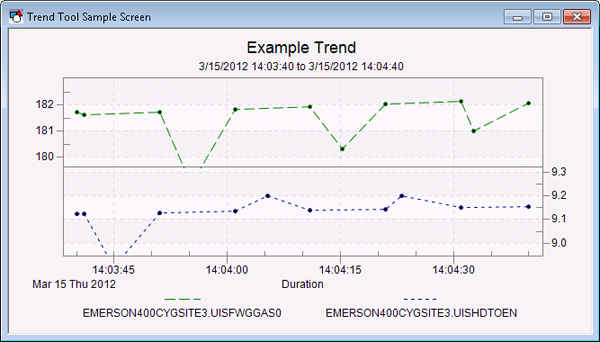
For a useful example of a Trend Tool implemented in a pre-designed screen, open UDC_TRND.csf in the APPS SCREXAMP folder.
For information about templated trends, see Using Template Screens.
Trend Types
Several types of trends appear in CygNet, most using a trend ActiveX control as its foundation. Each of the trend types is accessed in a different way, but they share many of the same properties and configuration procedures.
Implementations of the trend unique to CygNet Studio are as follows:
- Trend Tool: Trend Tools can be added individually from the Graphics Tools palette to a CygNet Studio screen in Edit mode.
- Default Trend: The Default Trend is an ActiveX trend control that is accessed from TheFrame/TheView. Although it is a property ([DefaultTrend]) of TheFrame/TheView, its configuration is essentially the same as a Trend Tool.
- Single-Point Trend: The Single-Point Trend is an ActiveX trend control that is available at runtime by means of a Trend option. The Single-Point Trend is available on a tool-by-tool basis for CygNet-aware tools. Its configuration relies on the default trend.
- Single-Point Trend with Rollups: The Single Point Trend with Rollups is an ActiveX trend control that is available at runtime by means of a Trend option. The Single-Point Trend is available on a tool-by-tool basis for CygNet-aware tools. Its configuration relies on the default trend.
Trends are also provided in CygNet Measurement, CygNet Notes, Energy Load Forecasting (ELF), CygNet Service Diagnostics Utility, and the ServiceMon Administration Utility. See Trending Data for more information.
More:
 Using the Trend Tool in Run Mode
Trend Tool - Properties, Events, and Methods


